Converting Data
Data conversion is the primary task of the MusicXML Tasks tool. Conversion to a relational database especially, allows for the use of the many software tools available for viewing and analyzing data. An example given elsewhere in this guide is using Business Intelligence (BI) software to perform simple statistical analysis on sample scores.
The layout of the Convert tab panes reflects the conversion process, with the from-conversion pane on the left and the to-conversion pane on the right.
Each conversion pane has its own select list of available data types.
Selecting a data type in one pane will dynamically change the available data types in the other select list and reveal the conversion pane where you enter the data conversion information.
To convert data, make a from-conversion selection, a to-conversion selection, enter the information in each pane, and then press the "Convert" button.
The subpages of this page explain in more detail each from- and to-conversion pane.
Conversion process
Every conversion (except LilyPond to PDF) first converts the input data to a central data structure, and then from there to the output format.
Java Beans
Java beans, as defined by the MusicXML schema, are at the center of the conversion process.
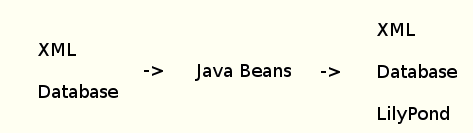
From XML
To convert from MusicXML, the XML file is converted to a Java XML Document using DOM (Document Object Model).
MusicXML timewise files are first transformed to a partwise document before conversion to Java.
Java Handler classes in the tasks application navigate the Document and create the Java beans.
Bean instantiations that are repetitive are handed off to Factory classes that return newly-created Java beans.
The bean structure preserves document declarations, comments and processing instructions, and whether XML input is in partwise or timewise format.
To XML and LilyPond
Conversion to the text output of XML and LilyPond uses the tasks application's Builder classes that are designed to convert from the intermediate Java bean structure to the output format selected. XML and LilyPond output each use their own set of Builders designed to produce their output type.
LilyPond output Builder classes use reflection to call the correct Builder class and method, according to a naming convention that the application expects, passing as an argument the Java bean that will be examined by the LilyPond Builder to generate LilyPond output. If the LilyPond Builder generates a call to an unimplemented method, that means that that LilyPond output feature is unimplemented, and the method call is ignored and the unimplemented call is noted in console output. This architecture makes it easy to add to LilyPond output features by simply adding and implementing the method in question for the output feature that needs to be added, while at the same time avoiding adding any number of empty, unimplemented methods to the code.
To and from relational database
Java beans are mapped to the database using Hibernate annotations. Mapped Java beans are annotated as Hibernate entities, and Java bean data members are mapped as database table columns, including using subselect annotations for one-to-many relations. The database schema tables are also created from the Hibernate annotations, and users can also view the SQL queries that Hibernate generates, if they wish.
To PDF
All conversions to PDF use the LilyPond PDF creation capability that's built into LilyPond. Any conversion to PDF that's not already in LilyPond file format is first converted to LilyPond by the conversion process described above.